Flight crew, cabin crew, and drone pilot logbooks only
Partner connectors are only available for flight crew, cabin crew, and drone pilot logbook types. The connector option is not available for aviation maintenance experience logbooks.
Understand what the connector does
A partner connector lets your own company system exchange access-controlled flight data with ProLogbooks. The repo is not opening a public user API. Instead, the connector is a strict server-to-server contract between your server and ProLogbooks.
The flow always starts with the correct paid plan on the ProLogbooks account. Once the connector is active, one business account can expose one partner connector, then invite the users who are allowed to sync through it.
- Your server sends or refreshes the list of allowed user emails inside ProLogbooks.
- ProLogbooks generates one stable user access token for each allowed email address.
- When a connector-linked logbook user runs Check, Preview, or Sync, ProLogbooks calls your server with the user email and the user access token.
Keep the two secrets separate
The connector API key and the user API key do different jobs. The connector API key identifies the partner company connection itself. The user API key shown on the Connector users page is the per-user access token that proves one email address is allowed to use that connector.
Do not put either value in browser JavaScript or expose it outside the intended UI. The connector API key belongs in secure server configuration. The user access token should be stored in your partner database beside the user record that ProLogbooks is allowed to check or sync.
Authorization: Bearer lbc_your_connector_api_key

{
  "email": "pilot@example.com",
  "access_token": "stable-user-token-from-prologbooks"
}
Know which page controls which part
The Partner connector card on the Account page is where you save the connector display name, the endpoint URLs that ProLogbooks will call, the active or inactive state, and the shared connector API key.
The Connector users page is where you allow individual email addresses, copy each user API key, watch whether the user account is not created, pending, or active, and send invitation or activation emails when needed.
The internal repo UI endpoints such as `/api/connectors.php` and `/api/partner-connector-users.php` are session-protected browser endpoints. Your partner server should not call them directly. The only bearer-token repo endpoint intended for the partner system is `/api/v1/connectors/import-emails.php`.
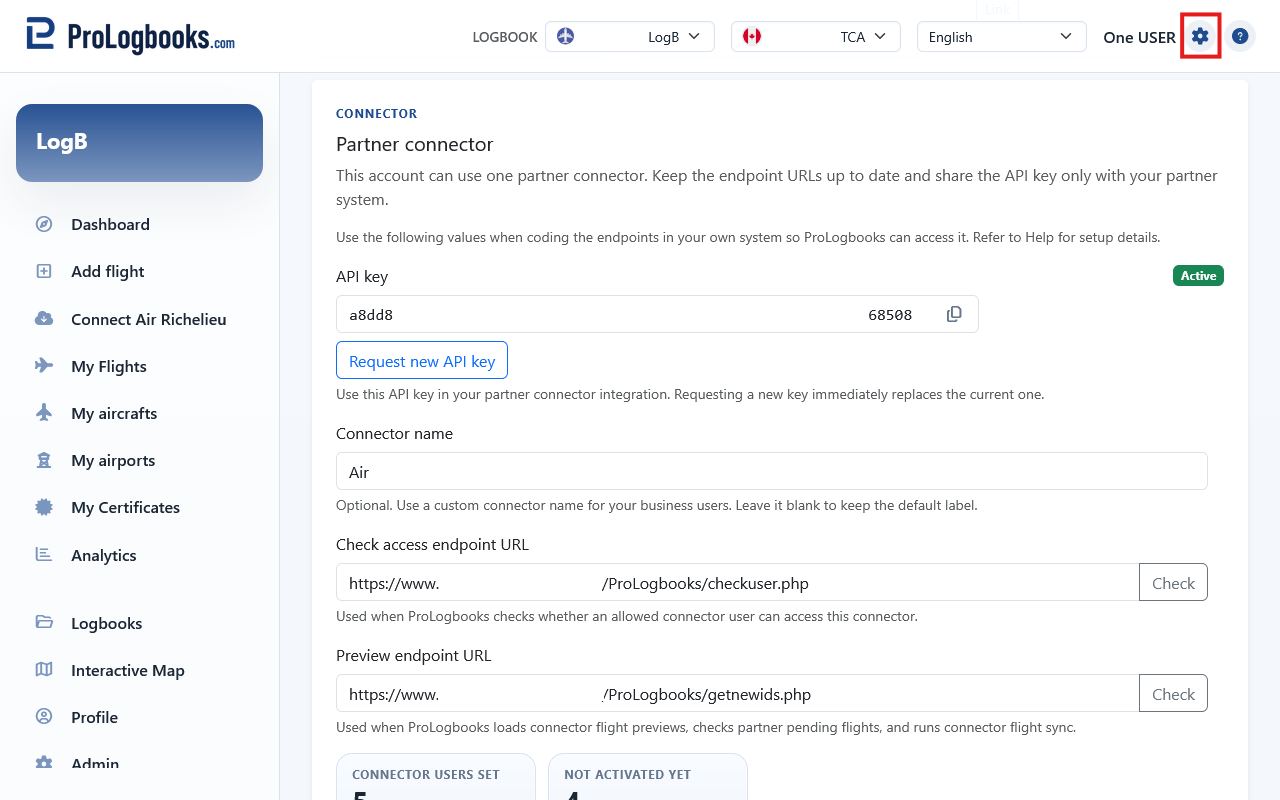
If something goes wrong
- If the Partner connector card does not appear, the account plan probably does not include partner connectors.
- If the saved connector suddenly stops authenticating, check whether someone regenerated the connector API key, because the previous key stops working immediately.
- If a user can sign in to ProLogbooks but still cannot sync, confirm that the exact lowercase email address exists on the Connector users page and that your server stored the latest user access token for that email.