Print a PDF logbook
The PDF Print option generates a formatted logbook with a cover page, column headers, and one row per entry. Choose the page size and orientation in the options dialog before downloading.
The PDF uses the same style as other ProLogbooks print exports: navy header band, authority colours, and the ProLogbooks logo. The output reflects the active filters at the time you open the dialog, so apply filters first if you only want a subset of entries.
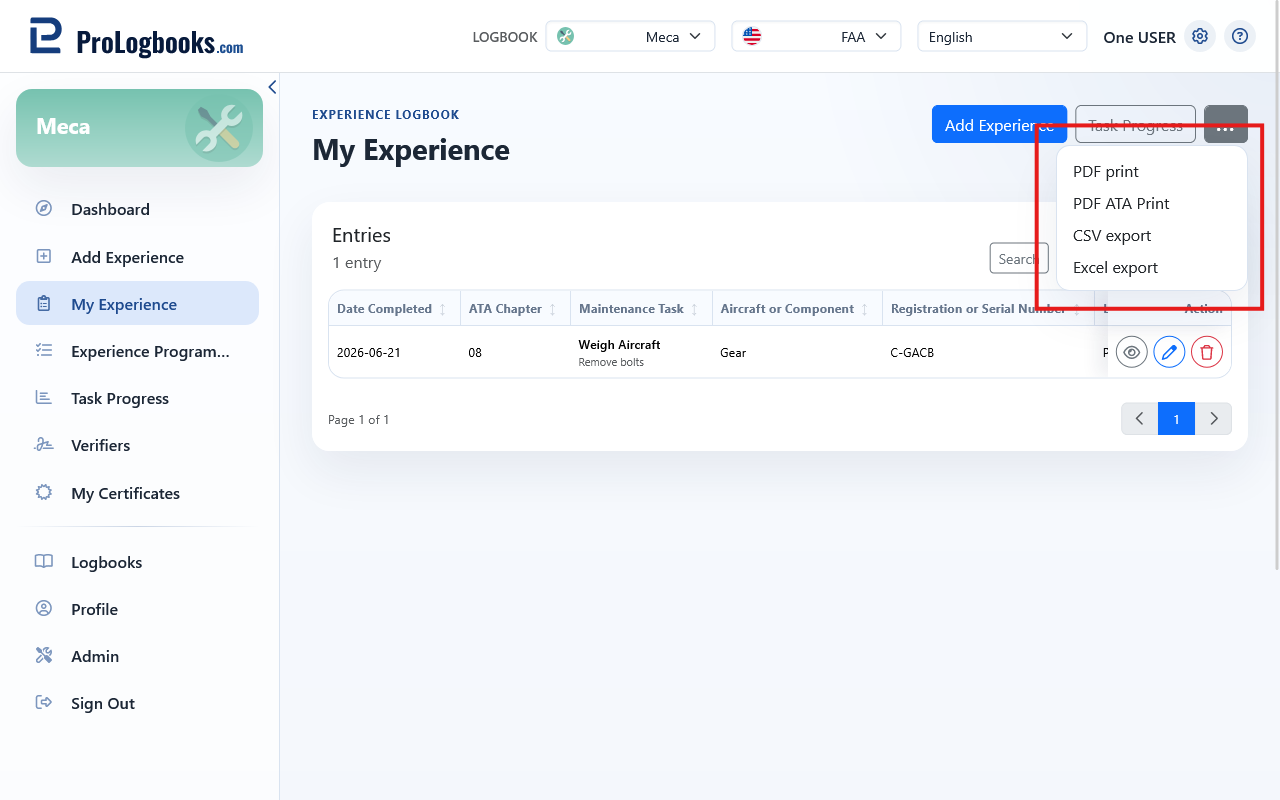
- Apply any filters you need on My Experience.
- Open the export menu using the ellipsis or the export button.
- Select PDF Print.
- Choose the page size and orientation.
- Click Print PDF and wait for the download to start.
Print an ATA task list
The PDF ATA Print option produces a summary task list grouped by Experience Programme, ATA chapter, and ATA subchapter. Each row shows the task name, the number of entries, the date range, the total hours, and the verification status.
This format is useful when you need to present a structured summary to a regulatory assessor or an authorised examiner, because it mirrors the layout of official task-list forms.
- Open the export menu.
- Select PDF ATA Print.
- Choose the page size and orientation.
- Click Print PDF.
- The ATA print respects active filters, so you can limit the output to one programme or one ATA chapter.
- Verified tasks show a "Verified" status, partially signed tasks show "Partial", and unsigned tasks show "Not Verified".
Export to CSV or Excel
CSV and Excel exports produce a row-by-row file of all visible entries. These formats are useful for further analysis, for submission to a training organisation, or for keeping an offline backup.
- CSV is a plain text file compatible with any spreadsheet application.
- Excel produces an XLSX file with column widths and basic formatting.
If something goes wrong
- If the export menu is not visible, your current plan may not include print and export.
- If the PDF download does not start, check that pop-up blocking is not preventing the file from opening.
- If the ATA task list is empty, confirm that entries exist and that no filter is hiding all of them.