Create a programme
Open Experience Programmes from the Maintenance Experience navigation. Use the create form to enter a programme name and choose the regulatory authority. The authority choice controls which columns and optional fields appear in the entry form and in exports.
Available authority frameworks include Generic, EASA Part-66 Basic, EASA OJT, FAA Mechanic, and TCCA AME. Choose the one that matches your target licence or competency certificate.
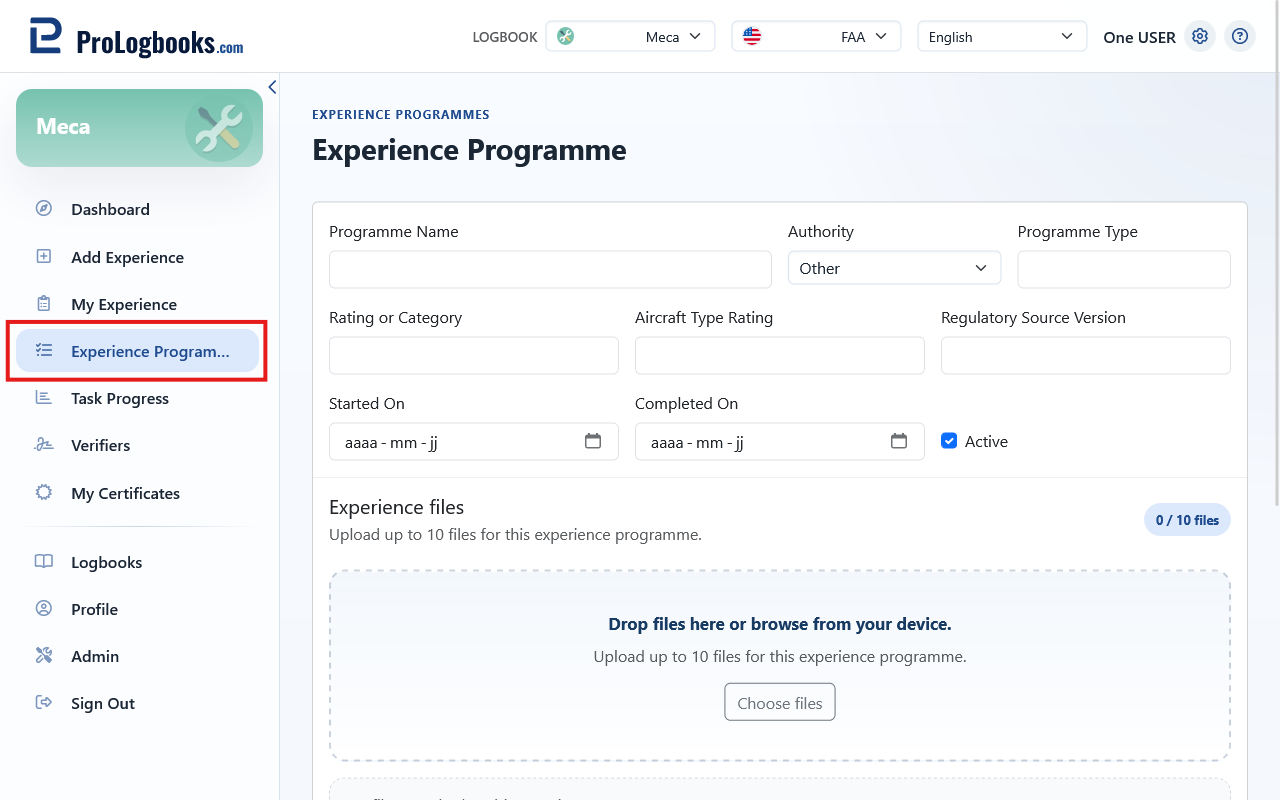
- Open Experience Programmes.
- Click Add Programme.
- Enter a programme name.
- Select the authority framework.
- Save the programme.
Edit and delete programmes
Use the edit icon in the programme row to rename the programme or change its authority. Changing the authority does not alter existing entries, but it may change which columns appear in exports going forward.
A programme can only be deleted when no experience entries reference it. If the delete icon is not shown, the programme is in use and you must reassign or delete its entries first.
- Programme names appear in grouped PDF exports as section headers.
- Delete is hidden when the programme is referenced by one or more experience entries.
If something goes wrong
- If the delete icon is not visible, the programme is already referenced by experience entries.
- If the authority dropdown is missing an option you need, contact support.